
Mediatomb makes your PS3 finally useful.

Ca 8 months ago I bought a Playstation 3. I was fascinated by its ‘supercomputer in a box’ claims, found Cell technology mildly interesting and it’s been a long time since I’ve been playing a good first person shooter. As Amazon had a good deal that included “Resistance: Fall of Man” I had this magnificent geek box sitting next to my TV in no time.

If you look at it objectively, it really does offer a lot for its moderate price: it can play Blue Ray, DVDs, CDs and all sort of other discshaped things, USB keys, can hook up to your Ipod and all other sort of things. It does Bluetooth, Wifi and, crucially, has uPNP capabilities: for those non-Geeks out there it means it can play movies and sound files that are lying on other computers around the house by the virtue of wifi.

In the past I managed to get this done thanks to my single Windows machine in the house, but who wants to have one of those monsters on, wasting electricity all the time. Now, thanks to Ubuntu, the AspireOne and Mediatomb this is all much more elegantly organised:

As the AspireOne is only fired up for work at home (it never ends, you know) my need for a decent musical background begins exactly at the same time. With the PS3 hooked up to a decent pair of speakers this is (though of course not hi end, due to the fact that the music on the Aspireone is encoded in some sort of compression format) an easy way to put my 28 GB music collection to use. Mediatomb is surprisingly easy to install and configure for a Linux product concocted by without doubt very nerdy but ultimately nice gentlemen (just look at the guy who looks after Rhythmbox for Gnome. You wouldn’t even mind living next to him. And that’s a big compliment for your average Gnome coder).

This is of course not perfect, and I am aware of the acute lack of proper, non-encoded tunes in my household. There is still the matter of 450 vinyl records stored away in a warehouse in Ilford, but before I could peruse these again I have to source a decent amp, a set of proper electrostatic speakers and dig out my Thorens turntable, so that will take a bit.

In the meantime I am quite happy to enjoy Charlie Parker in mildly compressed form.

Sometimes even music reproduction is being hit by compromise.

Tough. I know.

Where to go when you’re an AspireOne user.

The EEEpc’s community has already been well documented, so today a shout out for the two sites keeping the AspireOne users out there happy, supported and content: AspireoneUser.com is a blog cum forum, serving the need of the AO community and is incredibly helpful (especially the forum, which really produces some astounding guides and hacks, thanks to its resident ultra-alpha geeks).  Macles* keeps an eye on the software side of things, offering downloads for the Acer Bios upgrades and points to updates.

Both excellent sites, both well worth visiting.

Bill Bailey: Mumbler in Chief

I adore Bill Bailey. Who doesn’t? How can you not love a multi instrumental polymath with a anarchic streak and the politic leanings of an European leftie who refuses to swear on stage and still makes you laugh harder than any of the other ‘comedians’ out there. I still insist that Part Troll is the best comedy DVD ever released and by now I think I know it by heart. Last month I went to the Royal Albert Hall to see the man do his thing with Anne Dudley and the BBC Concert Orchestra and last weekend me and the best girlfriend ever watched the newest release of the master, ‘Tinselworm’.
Both in the Royal Albert Hall and on Tinselworm Bill Bailey’s greatest fallacy comes to light: the Master of Comedy is a terrible mumbler! While live in the Royal Albert Hall the best girlfriend and I blamed the crap sound, in Tinselworm it finally became apparent that the man is slurring his gags, especially when they come at the end of an elaborately set up routine: the last, decisive part of the sentence becomes a meaningless ‘snmvrbbsssschnffff’. One routine we had to listen to 5 times before we finally understood the whole thing, and it turned out to be the most brillant aside in the whole show.

It must be the side-effect of repeating your gags again and again that you finally throw them away as unidentifiable asides. Shame, but if you’re motivated enough to listen to the man again and again, the best gags are hidden under layers of mumbling.

Ubuntu on the Aspire One

Hello all,

after a short break from posting, Messagedfromtheouthouse is now back in action. Work unfortunately was a bit overwhelming over the last two weeks, but after a nice and quiet weekend filled with lounging on sofa and bed and some serious Indian cooking I am appropriately refreshed to get back to the important business of blogging. Anyway, I am sure you all remember that I recently bought an Aspire One, Acer’s answer to the EEEpc, the lovely little white laptop that is giving so much joy to the best girlfriend ever (and millions of happy clients all over the world). Faced with a serious shortage of EEE’s in my vicinity, I went for the Aspire One with it’s chunky 120MB HD and more generous sized keyboard. Fitted with ‘Linpus Lite’, I was moderately happy with the machine, though it’s ancient software suite and garish desktop design annoyed me slightly.That and it’s annoying fan, but that’s a different story.

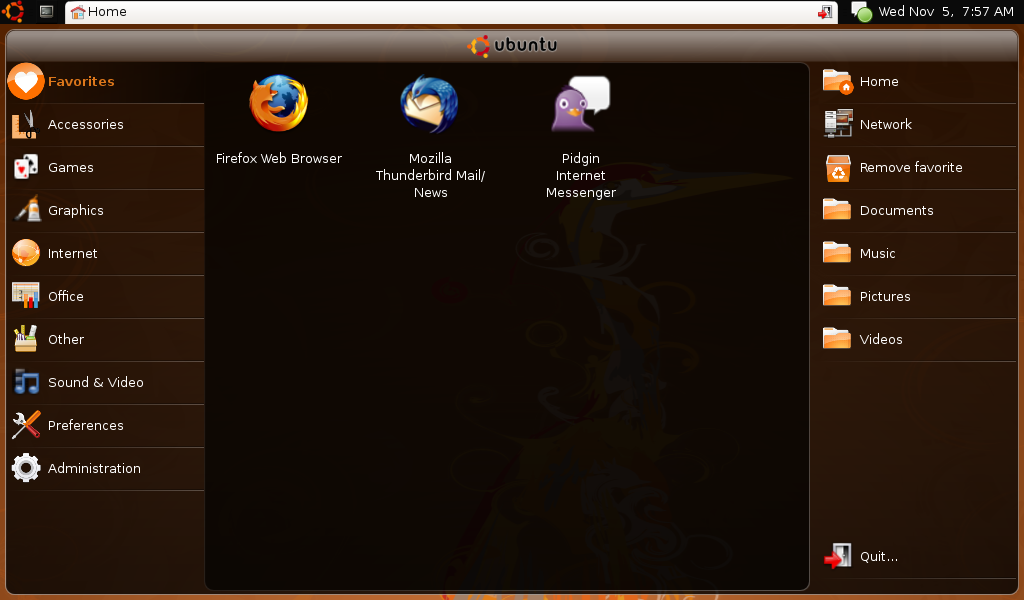
This weekend I finally had the chance to change the operating system, and after much soul searching I went for Ubuntu’s Netbook Remix (NMR). And boy, the change is immense.

But first things first: the current NMR is based on Ubuntu’s Hardy Heron with some kernel tweaks for Intel’s weird little Atom processor and some proprietary drivers for the built in wifi. The installation is straightforward: download the image, transfer it unto a USB key, boot the AspireOne from the USB key and Robert is your mother’s brother. After the first boot all you have to do is add some personal details and everything just works. Firefox 3, Evolution, Open Office 2.4, all wrapped up in a very tasteful GUI, devoid of the terrible vomit green and orange colours that Linpus Lite was offering.

Battery management seems improved, wifi works, audio works (and somehow sounds not as flat. Maybe due to a different Alsa version?), webcam works, and now I have access to Ubuntu’s massive repositories and I don’t have to dabble with Fedora’s weird package management system anymore. A win-win situation.

Suddenly working with the AspireOne seems to be much more fun.