As a delighted Igoogle user, I needed a quick way to sync Ical to with Google calendar. Scott McNulty comes to the rescue, with an excellent description how to achieve this quickly and painlessly.
Bravo.

As a delighted Igoogle user, I needed a quick way to sync Ical to with Google calendar. Scott McNulty comes to the rescue, with an excellent description how to achieve this quickly and painlessly.
Bravo.
Slashdot was kind enough to alert me to a lovely story that developed recently: Sebastopol – a little commune in California that hosts the world’s nerdiest publisher and apparently a large alternative community that until now lived peacefully together – apparently contracted Sonic.net to develop a low-power Wifi Mesh network to give the community easy access to the internet and its obvious educational and economical benefits. But they didn’t expect the tinfoil-hat community of Sebastopol to sabotage the endeavour: as the council meeting agenda shows, on the 18th of March council member and pro tem mayor Linda Kelley requested a “Discussion and Action to Reconsider the City’s Wi-Fi Agreement with Sonic” . The Press Democrat – the local paper – reports that the ‘sustainable health institute’ supportes the notion, because ‘A little bit more is going to cause a little more problems’ and supported Sebastopol resident Sandi Maurer in her claim that ‘she is sensitive to electricity much as some people are sensitive to chemicals’.
I would suggest to Sandi and her physics-challenged friends to find herself a place in Sebastopol that will not only shield them from the evil WiFi terror but also protects them from FM and AM radio signals (the ‘sustainable health institute’ uses those evil radios to broadcast their healthy message), TV signals, mobile phone towers the sun and magnetism.
Good luck and happy tin-foil hat folding.
P.S. In the meantime we hope that the absence of WiFi signals will aid Councillor Kelley in the quick resolution of her misdemeanor vandalism case.
Hi all.
As you probably know, I recently made the switch from beach front housing in North Otago to semi-urban living in North Scotland. As I initially have to rent a place and space comes at a premium in the UK, I have a little space problem. I am the first to agree that my kind of spatial problems are not the usual ones, but then not everbody has a category in their blog called ‘Nerdinessa excellenta bombastica’. Here’s the problem: In my transitional rental accomodation there is a TV, an ancient chinese stereo and nil else for electronic entertainment. With other words, I had to find a way to play my games, listen to music, listen to Radio New Zealand and have wireless internet and somehow tie it all together. A quick and relatively simple solution was found by borrowing an old, 7 year old PC from my new workplace that was thoroughly cleaned and deep-formatted. I fortunately did not abandon my 400 GB sata HD full of music and movies in NZ and quickly found a cheap USB enclosure for it, so suddenly the underpowered little Duron (by now upgraded to 1 GB) had plenty of HD space to play with. By now a PlayStation3 had materialized, hooked up to my favourite set of Logitech 5.1 speakers. Now the question was how to tie it all together and turn the PS3 into a media centre. The easiest solution, embarassingly, turned out Windows Media Player 11 (Itunes still doesn’t share it’s contents with the PS3).
Now, before you all start yelling and swearing, please let me finish: I have been running Linux machines for ever now, but nevertheless, even Avahi, MythTV and other userland programs did not match the ease of WMP11’s ease of uPNP sharing. It was literally as easy as importing my 11000 media files from that HD, telling WMP who to share it with, setting up a new , automated playlist and choosing it over the PS3. Same goes for Xvid movies. I have Nullriver’s Media link running on my Macbook, providing extra Media fodder to the PS3 when needed, but I have to say that WMP 11 was the easiest to use.
So, together with my beloved Morrowind, Settlers 3 and Media streaming (all my Aly Cook records…), that 20 buck PC has turned into the center of my home entertainment.
I never thought I’d say that, but:
Thanks Bill
Last week one of my coworkers – let’s call him Ainsley – asked whether I had a small stereo in my large collection of electro junk that I was able to sell him. Unfortunately, apart from a cheap chinese clock radio there was nothing I was able to offer. Knowing that the only PC in the house just left with one of the kids to university, I suggested a small form factor pc as multimedia centre and source for music and to keep in touch with the kids.
Cost was a big issue, so as I had a boot full of recycleables anyway, I dropped by the Waitaki Resource Recovery Park and chose from a large heap of old and dusty PC a small little number that still sported a motherboard and a Pentium II. From a heap of PCI cards an D-Link ethernet card and an ISA sound card was quickly chosen. Cost: 7 NZ dollars (ca 5 US dollars/ 4 Euros).
I took the little dusty thing home, de-dusted it, plugged it in: nothing. Not a beep. So I exchanged the Power Supply Unit with one of the old ones that were lying around my own pile of electro rubbish and was rewarded with an angry beep by the mobo. Fortunately the friendly proprietor of Small Bytes Computing in Oamaru had his own pile of elector junk and 2 168 pin DRams were found and these 192 megabytes stopped the motherboard from making shrieking noises. An old keyboard and an old serial mouse were found as well, and I even had a nice NVIDIA AGP card from what must have been 2000 lying around.
The motherboard is an ‘Atrend’ ATC-6130. I presume Atrend doesn’t exist anymore, as I couldn’t find any evidence of it on the web, but there was a large amount of drivers and bios updates floating around, so the old thing was updated in no time. The bios was set to 1998, so that had to be changed, and USB support is rather patchy. Nevertheless: an old 5 Gigabyte seagate HD and an even older optical drive was found in that big pile of old hardware, and surprisingly the little computer booted easily into Damn Small Linux.
The question is of course, which operating system to run. Even with 192 MB of Ram, Ubuntu is a bit heft. Geubuntu is (while certainly a technical marvel) plain ugly with its golden theme and eye candy. Damn Small Linux is too geeky to use for a user who can barely find the start button on a windows machine, and as I wanted a Debian based distro (I’m not particularly good with the other distros) I went for Xubuntu. Thanks to Envy (doesn’t Alberto Milone look smouldering on that picture) and Automatix the little thing was set up in no time and is now able to play MP3s and CDs (unless you distract it with other hard disk activity) and it even attempts some frames of a flash movie on MP3. A flawed machine, no question, but able to email, play music and surf the web.
All for 17 dollars.
Merry Christmas, Happy Hanukah, Wonderful Id and a great Divali. And for the Atheists out there, have a lovely couple of days off (unless you’re a policeman/nurse/doctor/fireman/prostitute/priest/sysadmin/dj/environmental engineer/prime minister or any other profession that’s needed during the holidays).
The best girlfriend ever found an EEEPC under the christmas tree yesterday evening (well, to be correct, it was hidden in her handbag because that’s where it’s going to live). Until two weeks ago I had no clue what to give that precious woman, until, while surveying the current laptops on offer, she declared “they’re all far too chunky. I want something that fits in my handbag and that is easily taken to meetings where it obstructs the deskspace”. She was already using a G4 Ibook, knew about the existence of my own MacBook (that was still too large) and frowned upon Blackberries, TabletPCs and those terrible Windows Mobile devices. Sensible woman, she is.
So the only option was the OLPC really. But then it looked rather childish, had garish colours and would not make a appropriate item in the boardroom. The EEEPC, on the other hand, had traditional laptop looks, was white, just as affordable and featured everything a female geek by osmosis could want. So the EEEPC it was.
When the little box was delivered to my workplace, the response was impressive: I was immediately surrounded by a gaggle of nurses (or is it a flock of nurses?) who wanted to touch it, take it home with them and there was definetely swooning going on. Even one of my rather ungeekish male colleagues wanted to touch it, open it and made positive grunting noises about its size, keyboard and weight. So, the first test was passed with flying colours. Then the big moment: the discovery of the item on Christmas eve (which is when we get our presents, like proper people). When the best girlfriend ever opened her handbag to look for something unrelated, the Eee (which is how I’m going to abbreviate it) was found in the handbag’s depths with the comment: ‘that’s not mine!’. Then slow dawning of realization happened and enthusiastic noises were made, even euphoric yelps were heard. Later, after an enormous dinner and generous helpings of red wine I actually got my freshly washed fingers on it as well and was immediately taken aback by it: for a bloke of my hand size, the keyboard is certainly a bit on the small size, and the 800×480 screen would probably annoy me after more than thirty minutes.
But that’s were the difference lies: the best girlfriend ever is unlikely to use it for more than short bursts (not everybody spends half their waking time online) of online activity, and it certainly seems to be perfect to browse the net, email, write and listen to music. One 2 GB SD card will hold all the music and data that she will ever need outside work, and for movies these can be replaced easily be her in-house geek.
Here’s a picture of her reading E2:
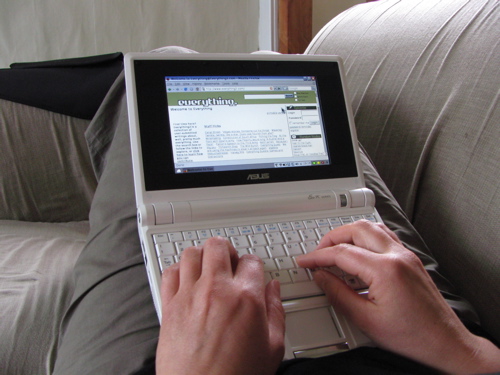
A complete and utter success.
Merry Christmas.
 Messaged from the Outhouse
